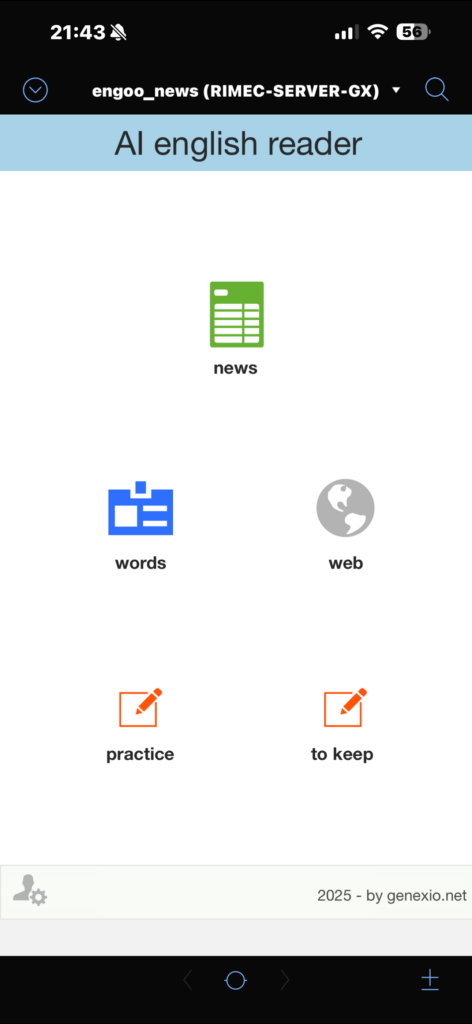
Note: there are many great apps to learn English. I wanted something different: a custom system built for me, with a clear logic and structured data. So I combined FileMaker (core data + UI), Node-RED (automation), and AI via API (ChatGPT) to generate learning content and feedback in a controlled way.
The goal is a repeatable, measurable workflow:
content → words → exercises → feedback → score → review
Architecture (short but concrete)
- FileMaker: database, interface, history, scores, levels, review, reports.
- Node-RED: automation and integrations (scheduled content import).
- AI (ChatGPT API): structured outputs to feed fields and logic without “noise”.
The key difference is that AI is not used as a generic chat. It is a component inside a system: output in JSON, parsing and saving into the right fields, plus logging for debugging and maintenance.
Section 1 — Automatic Engoo import + main word extraction
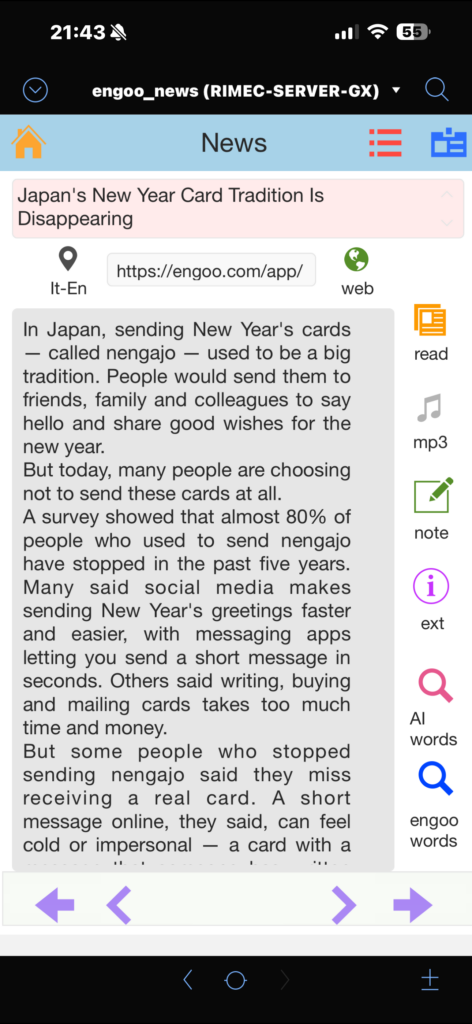
Every day, the app automatically imports one Engoo news article per day (selected from the most recently published items). The import is handled by Node-RED, then the content is saved into FileMaker and deduplicated using news_url as a unique key.
Thanks to Engoo for making this learning material available.
Example dedup logic (FileMaker):
Set Variable [ $url ; Value: <article_url> ]
Go to Layout [ “contents” (contents) ]
Enter Find Mode [ Pause: Off ]
Set Field [ contents::news_url ; $url ]
Perform Find
If [ Get ( FoundCount ) > 0 ]
  Exit Script [ Result: "ALREADY_IMPORTED" ]
End If
New Record/Request
Set Field [ contents::news_url ; $url ]
Set Field [ contents::ts_import ; Get ( CurrentTimestamp ) ]
Commit Records
Right after import, the system extracts the main words (keywords) from the text. This is the step that turns reading into study material (vocabulary + exercises).
Section 2 — Words: vocabulary cards (AI + structured data + MP3)
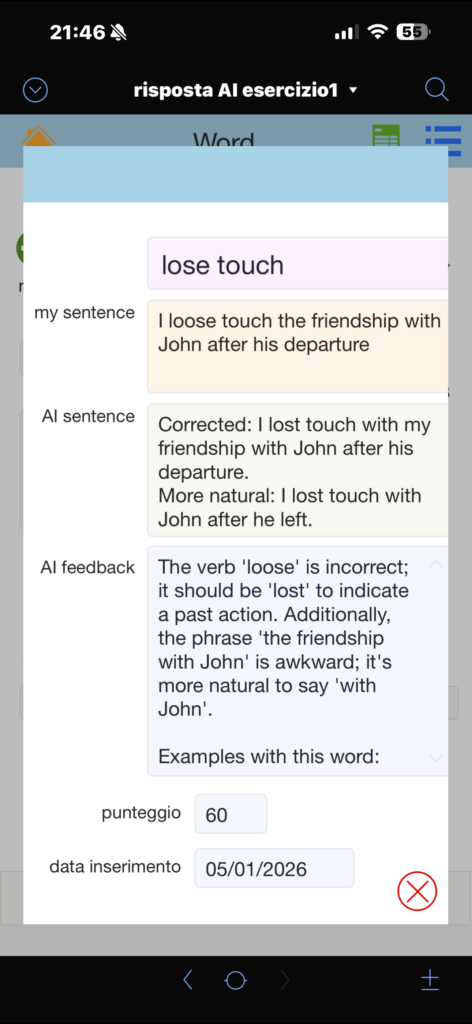
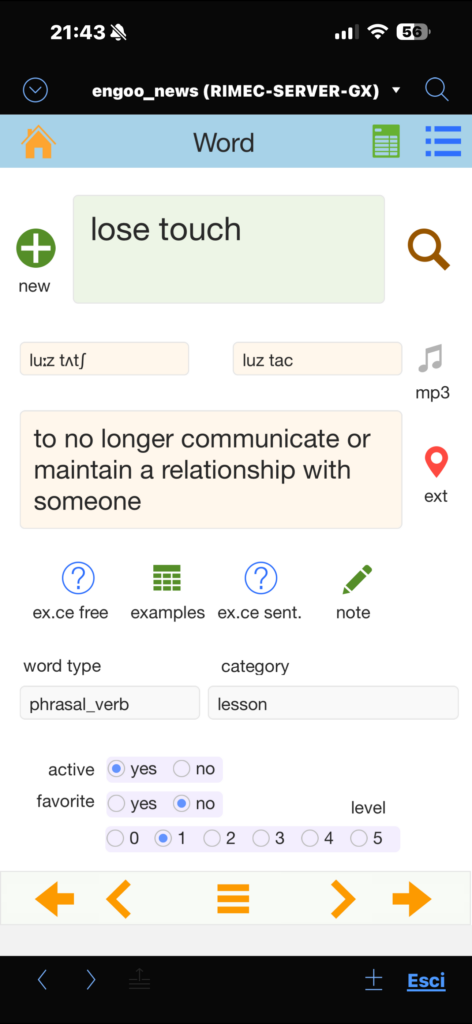
For each extracted word (or a word added manually), I generate a complete vocabulary card using AI:
- simple meaning in English
- Italian translation
- synonyms
- example sentences
- word type (noun/verb/adj…)
- pronunciation (IPA + “easy” version)
- MP3 pronunciation saved as a container file
Technical choice: the AI returns output in JSON (controlled schema). FileMaker extracts values with JSONGetElement and saves them into the correct fields. This makes the data searchable, reusable, and ready for reports and review.
Example “Words” schema (simplified) built with JSONSetElement:
Set Variable [ $schemaWords ;
  JSONSetElement ( "{}" ;
    [ "type" ; "object" ; JSONString ] ;
    [ "properties.word_type.type" ; "string" ; JSONString ] ;
    [ "properties.meaning_en.type" ; "string" ; JSONString ] ;
    [ "properties.meaning_it.type" ; "string" ; JSONString ] ;

    [ "properties.synonyms.type" ; "array" ; JSONString ] ;
    [ "properties.synonyms.items.type" ; "string" ; JSONString ] ;

    [ "properties.examples.type" ; "array" ; JSONString ] ;
    [ "properties.examples.items.type" ; "string" ; JSONString ] ;

    [ "properties.pron_ipa.type" ; "string" ; JSONString ] ;
    [ "properties.pron_easy.type" ; "string" ; JSONString ] ;

    [ "additionalProperties" ; 0 ; JSONBoolean ]
  )
]
Example AI response (JSON):
{
  "word_type": "verb",
  "meaning_en": "to save someone from danger",
  "meaning_it": "salvare, soccorrere",
  "synonyms": ["save", "help", "recover"],
  "examples": [
    "Firefighters rescued the child from the building.",
    "They rescued the project at the last minute."
  ],
  "pron_ipa": "/ˈres.kjuː/",
  "pron_easy": "RES-kyoo"
}
Saving into fields (FileMaker):
Set Field [ words::word_type ; JSONGetElement ( $resp ; "word_type" ) ]
Set Field [ words::meaning_en ; JSONGetElement ( $resp ; "meaning_en" ) ]
Set Field [ words::meaning_it ; JSONGetElement ( $resp ; "meaning_it" ) ]
Set Field [ words::pron_ipa ; JSONGetElement ( $resp ; "pron_ipa" ) ]
Set Field [ words::pron_easy ; JSONGetElement ( $resp ; "pron_easy" ) ]

Set Field [ words::synonyms_json ; JSONGetElement ( $resp ; "synonyms" ) ]
Set Field [ words::examples_json ; JSONGetElement ( $resp ; "examples" ) ]
Section 3 — Translate: EN ⇄ IT (AI)
Two-way translation (English → Italian and Italian → English), with saved history. Here too, I use JSON to keep outputs predictable and reusable (not “throw-away” translations).
Minimal schema example (concept):
JSONSetElement ( "{}" ;
  [ "type" ; "object" ; JSONString ] ;
  [ "properties.english_text.type" ; "string" ; JSONString ] ;
  [ "properties.italian_text.type" ; "string" ; JSONString ] ;
  [ "additionalProperties" ; 0 ; JSONBoolean ]
)
Section 4 — Exercises: the core of the project (everything saved and linked to words)
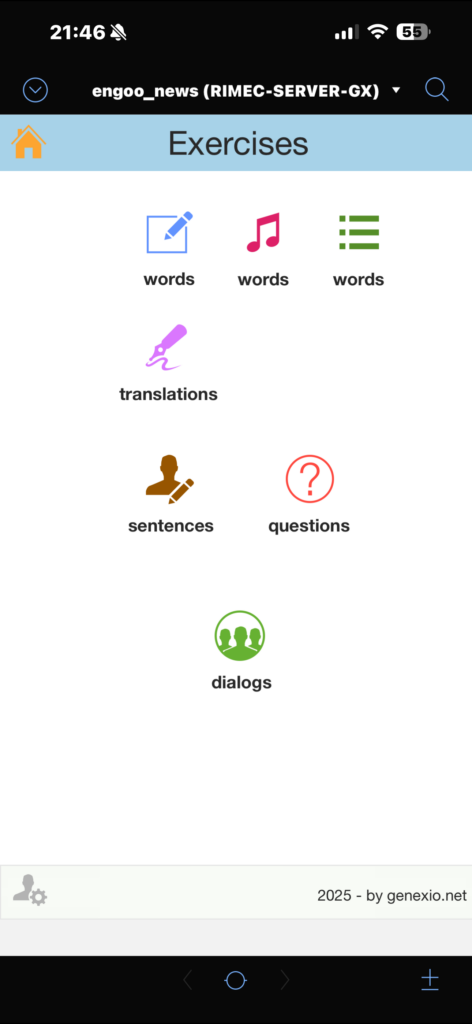
The vocabulary section is important, but the real value is Exercises: this is where I produce English (writing, listening, dialogue), so I can measure real mistakes, progress, and weak points.
Core rule: every exercise is saved and linked to words. This enables navigation and reporting such as:
- “all exercises linked to word X”
- “which words appear most often in mistakes”
- “most frequent error categories”
- “which exercises to repeat because score is low”
Practical implementation — suggested tables and relationships
contents (imported news): id_content, news_url (unique), title, body_text, ts_import, source.
words (vocabulary): id_word, word, word_type, meaning_en, meaning_it, synonyms_json, examples_json, pron_ipa, pron_easy, audio_mp3.
exercises (all exercises):
id_exercise(serial)exercise_type(e.g.writing_free,dictation,questions,errors_ita,verb_use,to_keep)difficulty_level,prompt_topic(optional)input_text,target_text(dictation),corrected_text,natural_textfeedback,error_tags_jsonscore,new_level,next_review_tsid_content_fk(if it comes from a news item)
exercise_words (bridge table exercises ↔ words): id_exercise_fk, id_word_fk, role (optional).
Relationships (concept):
contents::id_content = exercises::id_content_fkexercises::id_exercise = exercise_words::id_exercise_fkwords::id_word = exercise_words::id_word_fk
Section 4A — Free writing (sentences and short texts)
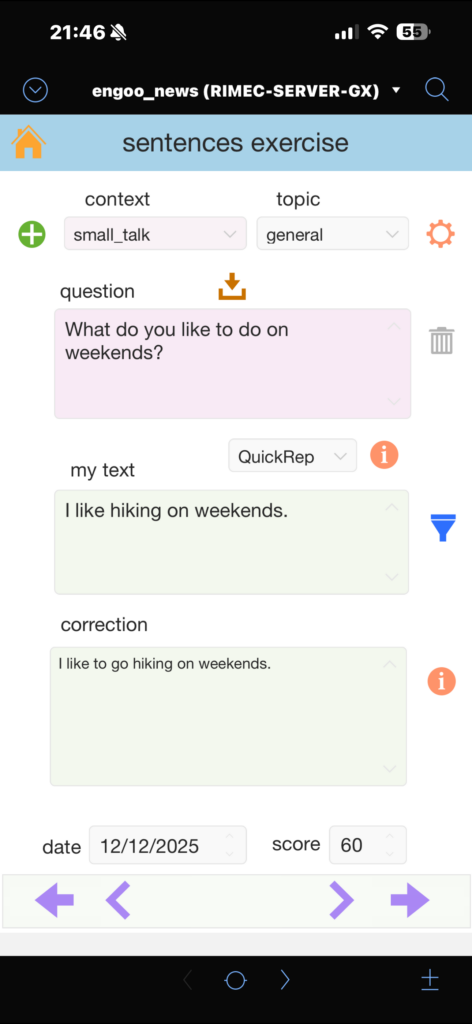
I write free text in English and the AI returns correction, a more natural version, feedback, and a score/level. The value is that everything is saved, so I can review mistakes and progress over time.
Example AI response (JSON):
{
  "corrected_text": "I try not to translate because I think it is useful for my brain.",
  "natural_text": "I try not to translate because I feel it helps my brain.",
  "feedback": "Use 'try not to' instead of 'try don’t'.",
  "error_tags": ["italian_interference", "negation", "style"],
  "score": 82,
  "new_level": 3,
  "days_until_next_review": 7,
  "linked_words": ["translate", "useful", "brain"]
}
Section 4B — Dictation: write a sentence after listening to audio
I listen to a sentence (audio) and then I write it. The AI checks accuracy and highlights typical issues (prepositions, collocations, natural phrasing), then assigns a score. This is effective because it trains listening + writing together.
Example AI response (JSON):
{
  "target_text": "It takes about ten minutes to get home.",
  "user_text": "It takes 10 minutes by home.",
  "corrected_text": "It takes about ten minutes to get home.",
  "feedback": "Say 'to get home' or 'to go home', not 'by home'.",
  "error_tags": ["preposition", "natural_phrase"],
  "score": 65,
  "new_level": 2,
  "days_until_next_review": 3,
  "linked_words": ["take", "minutes", "get home"]
}
Section 4C — Errors_ita and verb use: targeted exercises and error classification
Here the goal is not only to correct, but also to classify the mistake: Italian interference, verb form, tense, prepositions, articles, etc. These categories (tags) become data: I can filter, build statistics, and generate targeted practice later.
Example AI response (JSON):
{
  "corrected_text": "Tomorrow I will meet my wife.",
  "feedback": "After 'will', use the base form: will meet, will go, will do.",
  "error_tags": ["verb_form", "past_vs_base_form"],
  "italian_interference": "In Italian, the difference between base form and past form is less obvious here.",
  "mini_rule": "After 'will', use the base form.",
  "score": 72,
  "new_level": 3,
  "days_until_next_review": 7,
  "linked_words": ["will", "meet"]
}
Section 4D — Questions: simulated dialogue (topic + level)
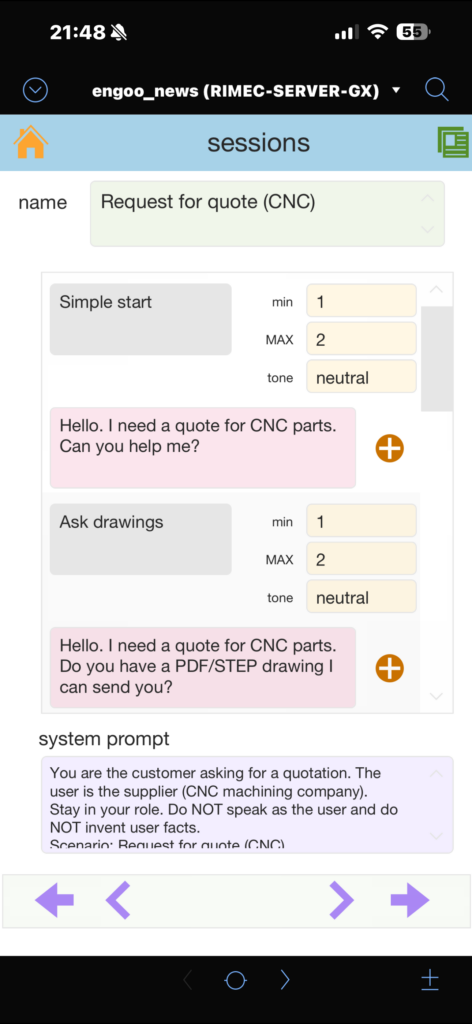
I choose a topic and a difficulty level and simulate a conversation: question, answer, correction, and better alternatives. I also added an anti-repetition logic to push for truly different questions (not just small rephrases).
Section 4E — To keep: save typical phrases
When I find useful and reusable phrases (typical, natural, “work-ready”), I save them in a “To keep” section. These phrases can also be linked to words and categories, so they stay inside the system (not scattered notes).
Example AI response (JSON):
{
  "keep_phrase": "Just let me know.",
  "meaning_it": "Fammi sapere.",
  "when_to_use": "When you want someone to update you later.",
  "variants": ["Let me know.", "Just let me know when you can."],
  "linked_words": ["know", "let"]
}
Single JSON schema for Exercises (standardize the output)
To manage multiple exercise types consistently, I use one common schema (with optional fields depending on the type). This keeps the pipeline stable: same parsing/saving logic even when the exercise changes.
Set Variable [ $schemaExercise ;
  JSONSetElement ( "{}" ;
    [ "type" ; "object" ; JSONString ] ;

    [ "properties.corrected_text.type" ; "string" ; JSONString ] ;
    [ "properties.natural_text.type" ; "string" ; JSONString ] ;
    [ "properties.feedback.type" ; "string" ; JSONString ] ;

    [ "properties.error_tags.type" ; "array" ; JSONString ] ;
    [ "properties.error_tags.items.type" ; "string" ; JSONString ] ;

    [ "properties.score.type" ; "number" ; JSONString ] ;
    [ "properties.new_level.type" ; "number" ; JSONString ] ;
    [ "properties.days_until_next_review.type" ; "number" ; JSONString ] ;

    [ "properties.linked_words.type" ; "array" ; JSONString ] ;
    [ "properties.linked_words.items.type" ; "string" ; JSONString ] ;

    [ "additionalProperties" ; 0 ; JSONBoolean ]
  )
]
Compute next_review_ts (simple spaced repetition)
After the AI response, I use days_until_next_review to compute the next review date/time.
Set Variable [ $days ; Value: JSONGetElement ( $resp ; "days_until_next_review" ) ]
Set Field [ exercises::next_review_ts ;
  GetAsTimestamp ( Get ( CurrentTimestamp ) + ( $days * 86400 ) )
]
Link exercise ↔ words (bridge table)
A practical workflow is to have the AI return linked_words[]. Then, for each linked word:
- normalize it (trim/lowercase)
- find it in
words(create it if missing) - create a record in
exercise_words
This way every exercise is searchable “by word”, and every word shows portals with linked exercises.
AI as a system component: API + JSON + logging
AI calls are managed as a single module (one FileMaker function/script): it builds the JSON payload, runs the API request, validates/parses the JSON response, and saves logs for requests/responses/errors. This keeps the integration maintainable and scalable (new exercises, new sections, voice in the future, etc.).
Thanks
- Engoo for the content.
- Peter, my English teacher, for keeping my motivation alive over time.
- Giulio Villani for FileMaker teaching.
- Fabio Bosisio for support on FileMaker and Node-RED.
Leave a Reply