Goal. Build an end-to-end local pipeline that:
- Generates short English sentences with a chosen topic and creativity (temperature),
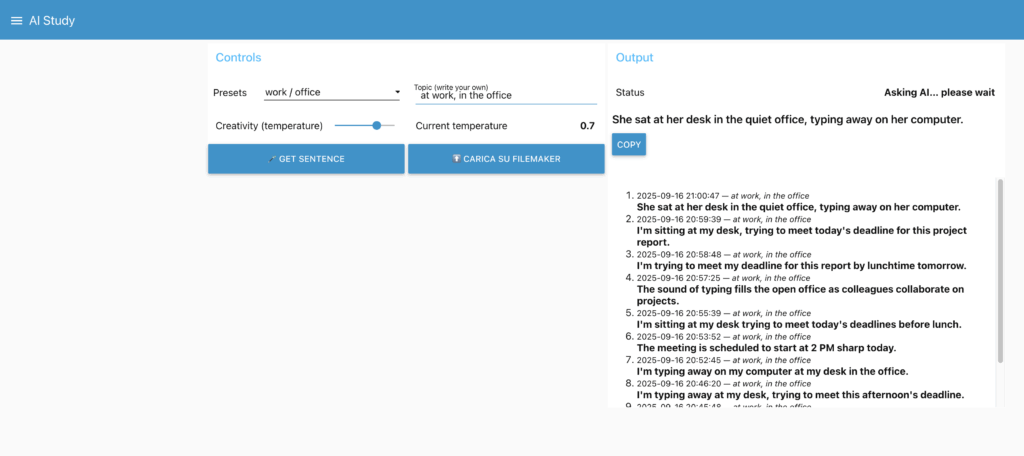
- Shows results in a Node-RED Dashboard,
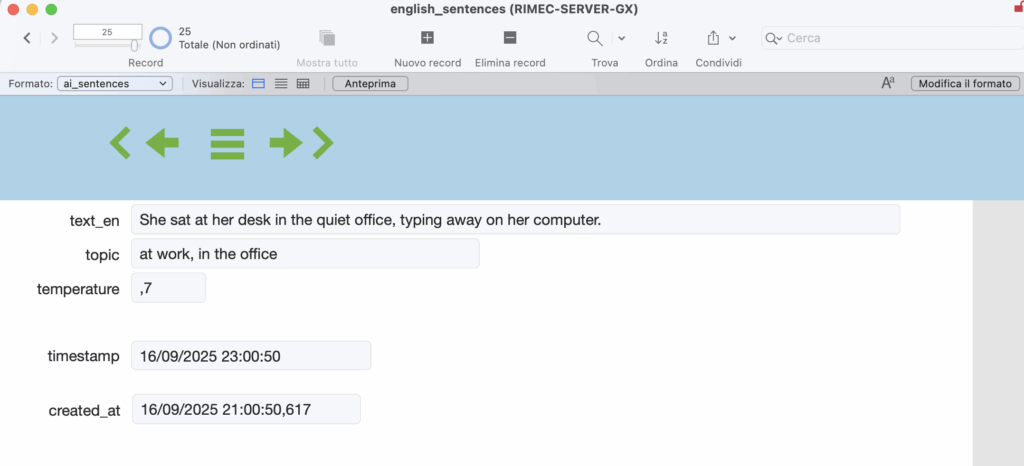
- Optionally saves them to FileMaker via OData (on demand).
Everything runs on-prem, with a free local LLM (Llama via Ollama), no cloud dependency or API costs.
Architecture
- Raspberry Pi (Debian 12/Bookworm): Docker host + Portainer CE + Node-RED. IP:
192.168.1.229 - Mac Studio: Ollama exposing the Llama model on the LAN. IP:
192.168.1.28, port11434 - FileMaker Server: OData endpoint over HTTPS. IP:
192.168.1.27, DB:arduino_connect, EntitySet:ai_sentences
Flow: Dashboard → HTTP to Ollama → clean/format → (optional) on-demand upload to FileMaker via OData.
1) Raspberry Pi: Docker, Portainer, Node-RED
1.1 Install Docker Engine
# update base
sudo apt update && sudo apt upgrade -y

# utils
sudo apt install -y ca-certificates curl gnupg lsb-release

# Docker repository (Debian)
sudo install -m 0755 -d /etc/apt/keyrings
curl -fsSL https://download.docker.com/linux/debian/gpg | sudo gpg --dearmor -o /etc/apt/keyrings/docker.gpg
echo "deb [arch=$(dpkg --print-architecture) signed-by=/etc/apt/keyrings/docker.gpg] \
https://download.docker.com/linux/debian $(. /etc/os-release; echo $VERSION_CODENAME) stable" \
| sudo tee /etc/apt/sources.list.d/docker.list > /dev/null

sudo apt update
sudo apt install -y docker-ce docker-ce-cli containerd.io docker-buildx-plugin docker-compose-plugin

# optional quality of life
sudo systemctl enable --now docker
sudo usermod -aG docker $USER
1.2 Portainer CE (web UI for Docker)
docker volume create portainer_data
docker run -d \
  -p 8000:8000 -p 9443:9443 \
  --name portainer \
  --restart=always \
  -v /var/run/docker.sock:/var/run/docker.sock \
  -v portainer_data:/data \
  portainer/portainer-ce:latest
Open https://192.168.1.229:9443, create the admin user, then “Get Started”.
1.3 Node-RED in Docker (persistent volume)
docker volume create nodered_data
docker run -d \
  --name nodered \
  -p 1880:1880 \
  --restart=always \
  -v nodered_data:/data \
  nodered/node-red:latest
Editor: http://192.168.1.229:1880
1.4 Node-RED Dashboard
In Node-RED: Menu → Manage palette → Install → install node-red-dashboard. The UI will be at http://192.168.1.229:1880/ui.
2) Mac Studio: Llama via Ollama (LAN)
2.1 Install Ollama
# with Homebrew
brew install ollama
# or official script
curl -fsSL https://ollama.com/install.sh | sh
2.2 Expose Ollama to the LAN
export OLLAMA_HOST=0.0.0.0:11434
ollama serve
Keep that process running (or create a service/launchd). Allow inbound 11434 in macOS firewall.
2.3 Pull the model
ollama pull llama3:latest
2.4 Remote tests from the Pi
curl -s http://192.168.1.28:11434/api/tags
curl -s http://192.168.1.28:11434/api/generate \
  -H "Content-Type: application/json" \
  -d '{"model":"llama3:latest","prompt":"Say hello","stream":false}'
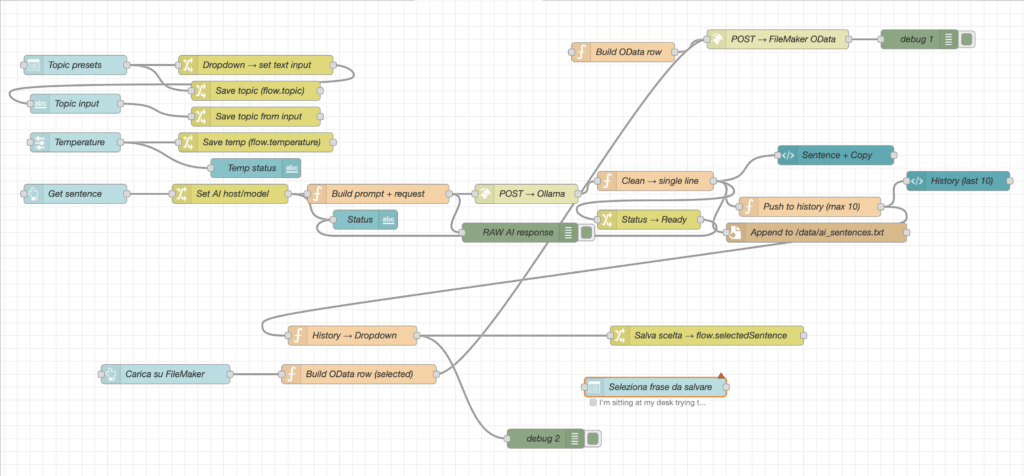
3) Node-RED Flow Design
3.1 Palette used
node-red-dashboard(ui_button, ui_text, ui_template, ui_slider, …)http requestfunction,change
3.2 Flow concept
- Inputs: a topic text and a creativity slider (temperature).
- Button: “Get sentence”.
- HTTP request to Ollama at
http://192.168.1.28:11434/api/generate. - Cleaning: convert the model output to one clean line.
- Dashboard: show the sentence + a Copy button.
- History: keep the last 10 sentences in
flow.history. - On-demand upload: button “Upload last sentence” → FileMaker OData.
3.3 Function: build request for Ollama
// Build prompt + HTTP request (Ollama)
const topic = (flow.get('topic') || '').trim();
const temperature = (typeof flow.get('temperature') === 'number') ? flow.get('temperature') : 0.7;

let prompt;
if (topic) {
  prompt = `Write ONE short, natural English sentence about: "${topic}". `
         + `No translation, no bullets. Max 15 words.`;
} else {
  prompt = `Write ONE short daily-life English sentence (no translation, no bullets). Max 15 words.`;
}

msg.method = 'POST';
msg.url = 'http://192.168.1.28:11434/api/generate';    // Mac Studio IP
msg.headers = { 'Content-Type': 'application/json' };
msg.payload = JSON.stringify({
  model: 'llama3:latest',
  prompt,
  options: { temperature },
  stream: false
});
return msg;
Node-RED v4 tip: set the http request node to Method = use and leave URL empty so it honors msg.method/msg.url.
3.4 Function: clean → single line
const resp = msg.payload && msg.payload.response ? String(msg.payload.response) : String(msg.payload || '');
let s = resp.trim();
s = s.replace(/^[-*\d\.)\s]+/, '');        // remove bullets/numbers
s = s.replace(/^"|"$|^'|'$/g, '');
s = s.replace(/\s+/g, ' ').trim();
msg.payload = s;

// remember the last sentence for on-demand upload
flow.set('lastSentence', s);
return msg;
3.5 History (last 10)
let hist = flow.get('history') || [];
const now = new Date().toISOString().replace('T',' ').slice(0,19);
hist.unshift({ t: now, topic: (flow.get('topic') || ''), s: msg.payload });
if (hist.length > 10) hist = hist.slice(0,10);
flow.set('history', hist);
return msg;
4) FileMaker via OData (on-demand insert)
4.1 Prerequisites
- User with privilege “Access via OData (fmoda)” (e.g.,
odata/odata). - Published EntitySet for the table (e.g.,
ai_sentences).curl -k -u odata:odata "https://192.168.1.27/fmi/odata/v4/arduino_connect/$metadata" | grep -i EntitySet
4.2 Button “Upload last sentence”
Function (build row):
let s = (flow.get('lastSentence') || '').trim();
if (!s) { node.warn('No last sentence available'); return null; }

const row = {
  text_en: s,
  topic: (flow.get('topic') || ''),
  temperature: (flow.get('temperature') ?? null),
  created_at: new Date().toISOString()
};

msg.headers = { 'Content-Type': 'application/json', 'Accept': 'application/json' };
msg.payload = JSON.stringify(row);
return msg;
http request node (OData):
- Method:
POST - URL:
https://192.168.1.27/fmi/odata/v4/arduino_connect/ai_sentences - Return: a parsed JSON object
- Use authentication: basic →
odata/odata - Enable secure (SSL/TLS): ON → TLS config with Allow self-signed ✅ and Verify server certificate ❌
5) Dashboard UX
- Controls: Preset (topic), Creativity slider, Get sentence, Upload last sentence.
- Output: Sentence (bold) + Copy button; History list (last 10); Status text.
6) Troubleshooting (what actually mattered)
- HTTPS vs HTTP: Ollama is HTTP. Using
https://...on port 11434 causes “SSL wrong version number”. - Node-RED v4 override: if the http node has URL/Method set,
msg.url/msg.methodwon’t override. Use Method = use + empty URL, or set URL/Method directly in the node and only build the payload in the function. - OData 401/403: user/privileges.
- OData 404: wrong EntitySet name (check
$metadata). - OData 415/400: missing
Content-Type: application/jsonor field names not matching the published table. - Self-signed cert: allow self-signed and disable “verify” in the http node TLS config.
7) Why an on-prem AI matters (and is free)
- Privacy & compliance: data never leaves the LAN.
- Cost control: free models via Ollama; no per-token bills.
- Low latency: instant responses for short prompts.
- Availability: works even if the Internet is down.
- Fast iteration: change model/prompt/temperature freely.
8) Possible extensions
- On-demand Italian translation (second Ollama call).
- De-duplication before upload (compare with latest row).
- CSV export of today’s sentences.
- Extra tone/tags (e.g., “formal”, “friendly”, “technical”).
- Dashboard auth; automatic backup of the
nodered_datavolume.
Slides and Node-RED flow exports are attached in the project repository.
Leave a Reply